서비스 기획에서, 기존의 bar chart에서 radar 차트로 변경되었다.
그래서 급하게 구글링을 해서 가장 UI적으로 괜찮은 라이브러리를 선정하여 반영했다.
1. 우선은 HTML에 id가 "myChart"인 canvas 엘리먼트를 삽입한다.
<div>
	<canvas id="myChart"></canvas>
</div>
2. 다음은 javascript에 소스를 불러온다.
<script src="https://cdn.jsdelivr.net/npm/chart.js"></script>
3. 샘플데이터를 생성해준다.
// 레이터차트 데이터
const data = {
  labels: [
    'Eating',
    'working',
    'Running',
    'Studying',
    'Teaching'
  ],
  datasets: [{
    label: 'My wannabe life',
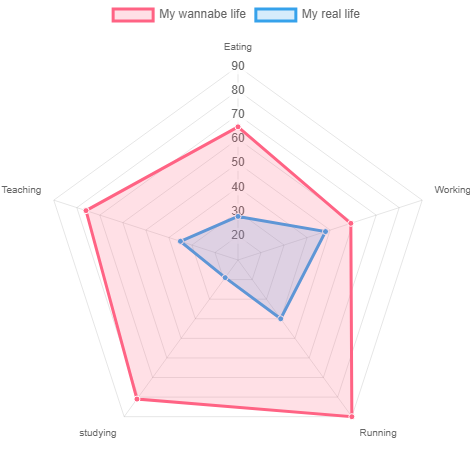
    data: [65, 59, 90, 81, 76],
    fill: true,
    backgroundColor: 'rgba(255, 99, 132, 0.2)',
    borderColor: 'rgb(255, 99, 132)',
    pointBackgroundColor: 'rgb(255, 99, 132)',
    pointBorderColor: '#fff',
    pointHoverBackgroundColor: '#fff',
    pointHoverBorderColor: 'rgb(255, 99, 132)'
  }, {
    label: 'My real life',
    data: [28, 48, 40, 19, 35],
    fill: true,
    backgroundColor: 'rgba(54, 162, 235, 0.2)',
    borderColor: 'rgb(54, 162, 235)',
    pointBackgroundColor: 'rgb(54, 162, 235)',
    pointBorderColor: '#fff',
    pointHoverBackgroundColor: '#fff',
    pointHoverBorderColor: 'rgb(54, 162, 235)'
  }]
};
4. 레이더차트 환경설정을 해준다.
//레이더차트 configuration
const config = {
  type: 'radar',
  data: data,
  options: {
    legend:{
        label: {
            fontColor: "red",
            fontSize: 10
        }
    },
    elements: {
      line: {
        borderWidth: 3
      }
    }
  },
};
5. 차트객체를 생성하여, 맨위에 지정했던 HTML태그 위치에 출력시킨다.
//차트 객체
const myChart = new Chart(
    document.getElementById('myChart'),
    config
  );
6. 결과
역시 가장 좋은 참고자료는 공식사이트이다.
https://www.chartjs.org/docs/latest/charts/radar.html
Radar Chart | Chart.js
Radar Chart A radar chart is a way of showing multiple data points and the variation between them. They are often useful for comparing the points of two or more different data sets. const config = { type: 'radar', data: data, options: { elements: { line: {
www.chartjs.org
'javascript' 카테고리의 다른 글
| [zingchart] javascript에서 워드클라우드 구현하기 (0) | 2022.05.30 |
|---|---|
| [Jquery] 검색어 자동완성 기능 autocomplete, ajax와 연동 (0) | 2022.04.27 |